Documentation
|
FieldTalk Modbus Slave C++ Library
Library version 2.11.0
|
Windows Platforms: Compiling and Linking Applications
Let's assume the following project directory structure:
Add the library's include directory to the compiler's include path.
Visual Studio Example:
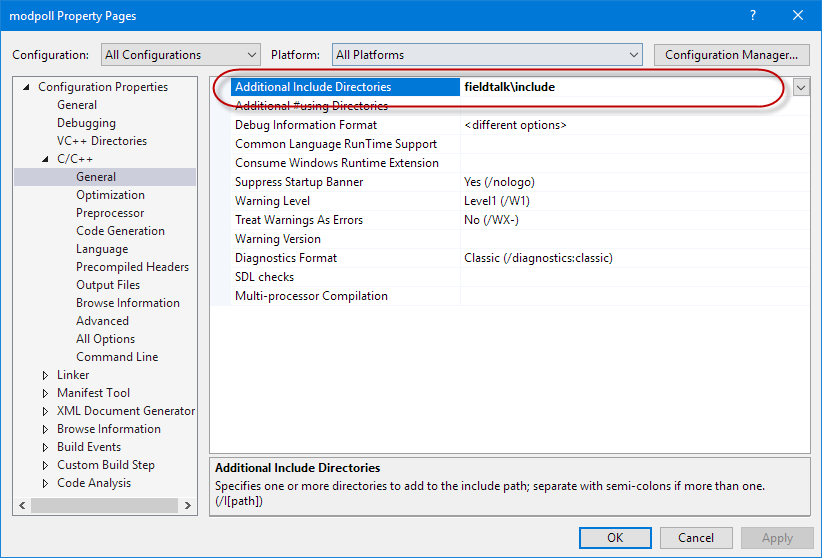
Visual C++ command line Example:
Add the file name of the library to the dependency list passed to the linker. Make sure the library chosen matches your CPU architecture (32-bit vs 64-bit). Use the Win32 library for 32-bit code and the x64 library for 64-bit code. Within Visual Studio you can use the macro to automatically select the correct library architecture. You also must pass the Winsock2 standard library Ws2_32.lib as additional dependency to the linker.
Visual Studio Example:
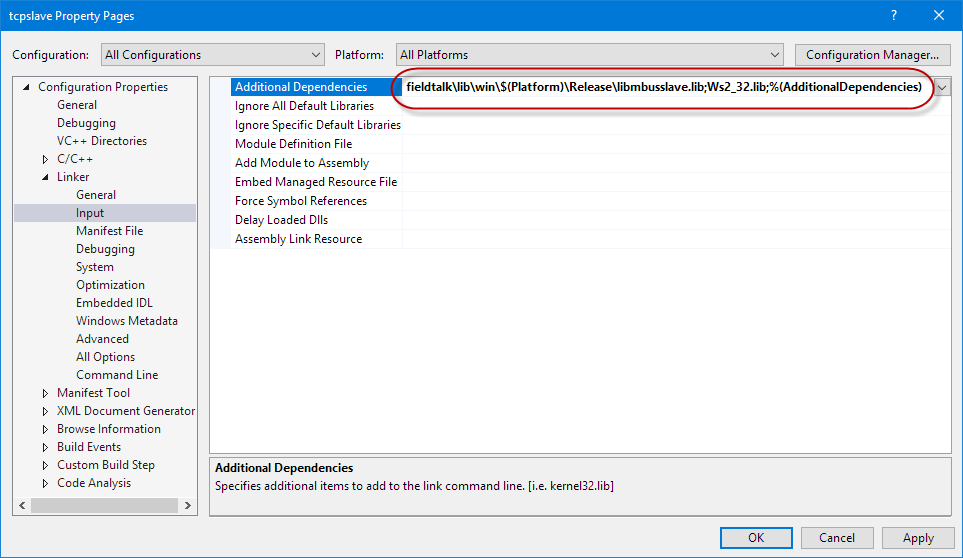
Visual C++ command line Example:
Linux, UNIX and QNX Platforms: Compiling and Linking Applications
Let's assume the following project directory structure:
Add the library's include directory to the compiler's include path.
Example:
Add the file name of the library to the file list passed to the linker.
Example: