diagslave is a simple command line based Modbus slave simulator and test utility. diagslave is using the FieldTalk™ Modbus driver.
Diagslave binaries are available for the following operating system platforms and architectures:
- Windows PCs
- Linux PCs
- Raspberry Pi, BeagleBoard and other ARM based Linux devices
| diagslave-3.5.zip | |
| diagslave-3.5.tgz | |
| System Requirements |
|
|---|---|
| License | This program is free; you can use it and redistribute it under the terms of the accompanying License document. |
Installation
Windows
Download into a folder and extract the zip archive. The diagslave.exe command must be run from a Command Prompt:win\diagslave -h
Linux
Download into a folder. Then unpack the tarball:tar xzf diagslave-3.2.tgzThe tarball contains multiple binaries for different CPU architectures. Run the version matching your system from the command line. Example for Raspberry Pi:
cd diagslave
linux_arm-eabihf/diagslave -h
Usage
Usage: diagslave [OPTIONS] [SERIALPORT]
Arguments:
SERIALPORT    Serial port when using Modbus ASCII or Modbus RTU protocol
              COM1, COM2 ...                on Windows
              /dev/ttyS0, /dev/ttyS1 ...    on Linux
General options:
-m ascii      Modbus ASCII protocol
-m rtu        Modbus RTU protocol (default if SERIALPORT set)
-m tcp        MODBUS/TCP protocol (default otherwise)
-m udp        MODBUS UDP
-m enc        Encapsulated Modbus RTU over TCP
-o #          Master activity time-out in seconds (1.0 - 100, 3 s is default)
-a #          Slave address (1-255 for RTU/ASCII, 0-255 for TCP)
Options for MODBUS/TCP, UDP and RTU over TCP:
-p #          TCP port number (502 is default)
-c #          Connection time-out in seconds (1.0 - 3600, 60 s is default)
Options for Modbus ASCII and Modbus RTU:
-b #          Baudrate (e.g. 9600, 19200, ...) (19200 is default)
-d #          Databits (7 or 8 for ASCII protocol, 8 for RTU)
-s #          Stopbits (1 or 2, 1 is default)
-p none       No parity
-p even       Even parity (default)
-p odd        Odd parity
-4 #          RS-485 mode, RTS on while transmitting and another # ms after
Options for Modbus RTU:
-f #          Tolerance for inter-frame gap detection in ms (0-20)
Usage Examples
To get help on usage run the following command:diagslave -hTo run a Modbus RTU server at 9600 baud on COM1 run:
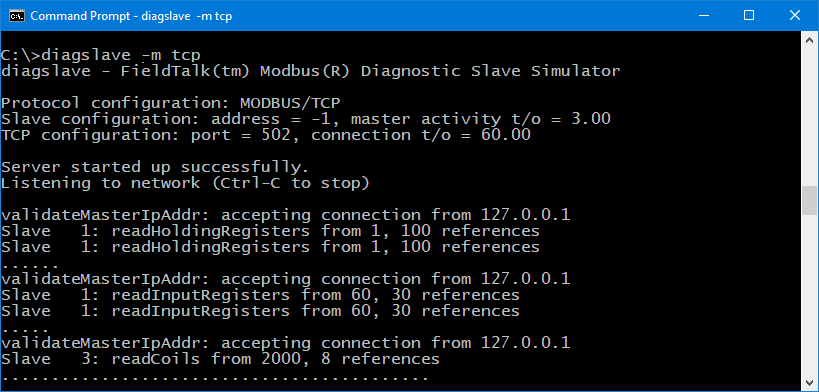
diagslave -b 9600 -p none -m rtu COM1To run a Modbus/TCP server on Ethernet run:
diagslave -m tcp