modpoll is a command line based Modbus master simulator and test utility. modpoll is using the FieldTalk™ Modbus driver.
Modpoll binaries are available for the following systems:
- Windows PCs
- Linux PCs
- ARM based Linux boards like Raspberry Pi, BeagleBoard and others
| modpoll-3.16.zip | |
| modpoll-3.16.tgz | |
| System Requirements |
|
| License | This program is free; you can use it and redistribute it under the terms of the accompanying License document. |
Installation
Windows
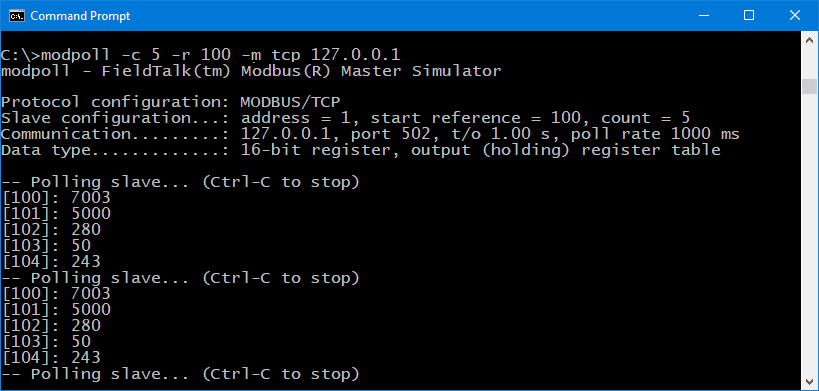
Download archive into a folder and extract the zip archive. The modpoll.exe command must be run from a Command Prompt:cd modpoll\win modpoll -h
Linux
Download archive into a folder. Then unpack the tarball:tar xzf modpoll.tgzThe tarball contains multiple binaries for different CPU architectures. Add the version matching your system architecture to the path. Example for ARM platforms like Raspberry Pi:
export PATH=$PWD/modpoll/linux_arm-eabihf:$PATHThen run modpoll:
modpoll -h
Usage
Usage: modpoll [OPTIONS] SERIALPORT|HOST [WRITEVALUES...]
Arguments:
SERIALPORT    Serial port when using Modbus ASCII or Modbus RTU protocol
                COM1, COM2 ...                on Windows
                /dev/ttyS0, /dev/ttyS1 ...    on Linux
HOST          Host name or dotted IP address when using MDBUS/TCP protocol
WRITEVALUES   List of values to be written. If none specified (default) modpoll reads data.
General options:
-m ascii      Modbus ASCII protocol
-m rtu        Modbus RTU protocol (default if SERIALPORT contains \ or COM)
-m tcp        MODBUS/TCP protocol (default otherwise)
-m udp        MODBUS UDP
-m enc        Encapsulated Modbus RTU over TCP
-a #          Slave address (1-247 for serial, 0-255 for TCP, 1 is default)
-r #          Start reference (1-65536, 1 is default). Use -0 for 0-based references.
-c #          Number of values to read (1-125, 1 is default), optional for writing (use -c 1 to force FC5 or FC6)
-t 0          Discrete output (coil) data type (FC 1)
-t 1          Discrete input data type (FC 2)
-t 3          16-bit input register data type (FC 4)
-t 3:hex      16-bit input register data type with hex display
-t 3:i32      32-bit integer data type in input register table
-t 3:i64      64-bit integer data type in input register table
-t 3:mod      32-bit module 10000 data type in input register table
-t 3:f32      32-bit float data type in input register table
-t 3:f64      64-bit double data type in input register table
-t 4          16-bit holding register data type (FC3, default)
-t 4:hex      16-bit holding register data type with hex display
-t 4:i32      32-bit integer data type in holding register table
-t 4:i64      64-bit integer data type in holding register table
-t 4:mod      32-bit module 10000 type in holding register table
-t 4:f32      32-bit float data type in holding register table
-t 4:f64      64-bit double data type in holding register table
-t id         Read device identification objects (FC 43/14)
-t file       File record reference type 6 (FC 20/21)
-n #          File number for file record (default is 4)
-u            Display data as unsigned integers
-i            Slave operates on big-endian 32-bit/64-bit integers
-f            Slave operates on big-endian 32-bit/64-bit floats
-e            Use Daniel/Enron single register 32-bit mode (implies -i and -f)
-x            Use Lufkin ELAM extensions (RTU and RTU over TCP only)
-0            First reference is 0 (PDU addressing) instead 1
-1            Poll only once only, otherwise every poll rate interval
-l #          Poll rate in ms, (1000 is default)
-o #          Time-out in seconds (0.01 - 10.0, 1.0 s is default)
Options for MODBUS/TCP, UDP and RTU over TCP:
-p #          IP protocol port number (502 is default)
Options for Modbus ASCII and Modbus RTU:
-b #          Baudrate (e.g. 9600, 19200, ...) (19200 is default)
-d #          Databits (7 or 8 for ASCII protocol, 8 for RTU)
-s #          Stopbits (1 or 2, 1 is default)
-p none       No parity
-p even       Even parity (default)
-p odd        Odd parity
-4 #          RS-485 mode, RTS on while transmitting and another # ms after
Usage Examples
To get help on usage run the following command:modpoll -hTo retrieve continuously 10 Modbus holding registers starting from reference 500 of slave ID number 3 with Modbus RTU at 9600 baud, no parity on COM1 run:
modpoll -b 9600 -p none -m rtu -a 3 -r 500 -c 10 COM1To retrieve once 5 floating point values starting from reference 100 with Modbus/TCP from slave device with IP 10.0.0.100:
modpoll -t4:float -r 100 -c 5 -1 10.0.0.100To write the value 1234 to register 1201 using Modbus/TCP and FC 16 (Write Multiple Registers):
modpoll -r 1201 10.0.0.100 1234To write the value 1234 to register 1201 using Modbus/TCP and FC 6 (Write Single Register):
modpoll -r 1201 -c 1 10.0.0.100 1234