Documentation for .NET Master Modbus Libraries


Introduction |
This FieldTalk Modbus Master Library for .NET provides connectivity to Modbus slave compatible devices for VB.net and C# applications.
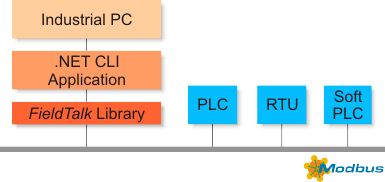
Typical applications are Modbus based Supervisory Control and Data Acquisition Systems (SCADA), Modbus data concentrators, Modbus gateways, User Interfaces and Factory Information Systems (FIS).
Features:
- Robust design suitable for real-time and industrial applications
- Full implementation of Bit Access and 16 Bits Access Function Codes as well as a subset of the most commonly used Diagnostics Function Codes
- Standard Modbus bit and 16-bit integer data types (coils, discretes & registers)
- Support for 32-bit integer, modulo-10000 and float data types, including Daniel/Enron protocol extensions
- Configurable word alignment for 32-bit types (big-endian, little-endian)
- Support of Broadcasting
- Failure and transmission counters
- Transmission and connection time-out supervision
- Detailed transmission and protocol failure reporting using error codes
 Library Structure
The FieldTalk .NET library consists of two components: a .NET Interop Library with MSIL code (managed code) and a Modbus Core Driver written in native code (unmanaged code). This architecture has significant performance benefits for .NET applications because the time critical communication code is executed as native code.
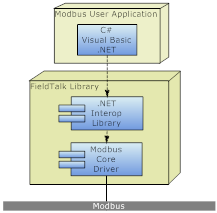
The two components are contained in separate files: FieldTalk.Modbus.Master.dll contains the .NET Interop Library and libmbusmaster.dll the native Modbus Core Driver. These two library files have to be deployed with your application.
For .NET Core, the deployment and loading of the native code library is taken care of by .NET core's package management. This works for Windows as well as for Linux platforms.
For classic .NET Framework 4.0 and 2.0, the deployment of the native code library is taken care of by the FieldTalk.Modbus.Master.prop file which the NutGet package manager will automatically add to your project. With that file, when compiling, a bin/x86 and a bin/x64 subfolder is created in the bin directory and the native libraries copied into these subfolders. When the .NET assembly is loaded, the correct native library will be loaded from one of these two sub-folders.
For the .NET Compact Framework (Windows Embedded Compact, Windows CE and Windows Mobile) the deployment of the native libray must be done manually.
The library's API is organised into one class for each Modbus protocol flavour and a common base class, which applies to all Modbus protocol flavours. Because the two serial-line protocols Modbus ASCII and Modbus RTU share some common code, an intermediate base class implements the functions specific to the serial protocols.
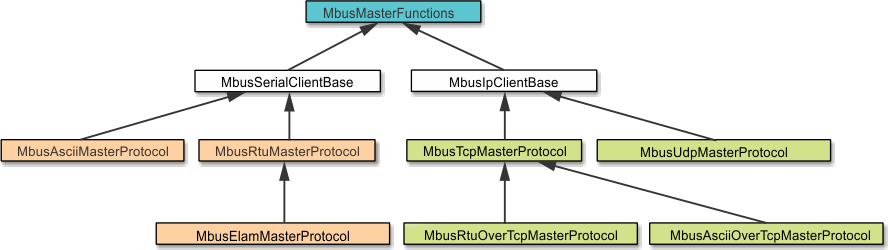
The base class MbusMasterFunctions contains all protocol unspecific functions, in particular the data and control functions defined by Modbus. All Modbus protocol flavours inherit from this base class.
The class MbusAsciiMasterProtocol implements the Modbus ASCII protocol, the class MbusRtuMasterProtocol implements the Modbus RTU protocol. The class MbusTcpMasterProtocol implements the MODBUS/TCP protocol and the class MbusRtuOverTcpMasterProtocol the Encapsulated Modbus RTU master protocol (also known as RTU over TCP or RTU/IP).
In order to use one of the four Modbus protocols, the desired Modbus protocol flavour class has to be instantiated:
After a protocol object has been declared and opened, data and control functions can be used: